Postby TheRumpledOne » Sat Jan 05, 2008 9:14 pm
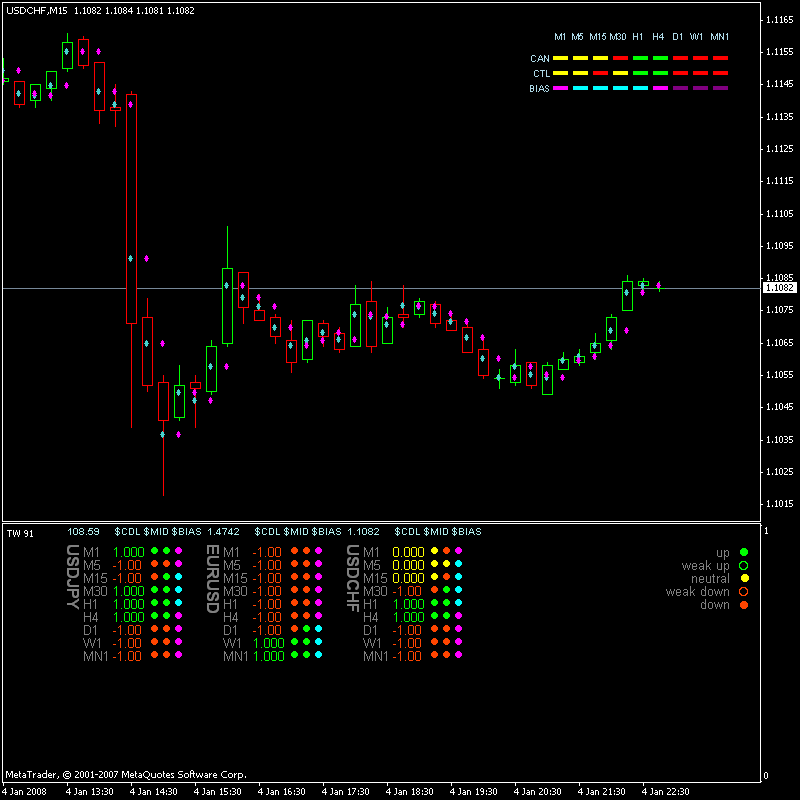
Since the point is to make money, let me explain how to use the TRO SAK with the default settings.
The first column, CDL, is candle color:
* When close is above the open of that period, the dot is GREEN.
* When close is below the open of that period, the dot is RED.
* When close is equal the open of that period, the dot is YELLOW.
The second column, MID, indicates price position relative to the midpoint of the previous candle:
* When close is above the previous midpoint, the dot is GREEN.
* When close is below the previous midpoint, the dot is RED.
* When close is equal the previous midpoint, the dot is YELLOW.
If columns one and two are green, you can go long.
If columns one and two are red, you can go short.
RULE OF THUMB: NEVER TRADE AGAINST THE H1 CANDLE COLOR. Of course, there are exceptions to the rule but do so at your OWN RISK!
The third column, BIAS, indicates the direction you should be trading and is used to EXIT the trade when the BIAS turns against you. It is ok to exit the trade before the BIAS changes but more times than not you will wish you had stayed in the trade:
* The dot is AQUA when you should be long.
* The dot is MAGENTA when you should be short.
It is usually NOT profitable to trade against the H1 BIAS. Staying in the trade as long as the bias is with you results in more pips per trade.
This can be used standalone or with any other system as an entry/exit confirmation.
IT'S NOT WHAT YOU TRADE, IT'S HOW YOU TRADE IT!
Please do NOT PM me with trading or coding questions, post them in a thread.